
Your server’s fans are running, a 4K film looks soft, and something is working much harder than it should. Jellyfin is transcoding, and the fix depends entirely on why.
Do not change settings yet. Jellyfin will tell you the reason, and the reason points at exactly one of the fixes below.
Get the reason first
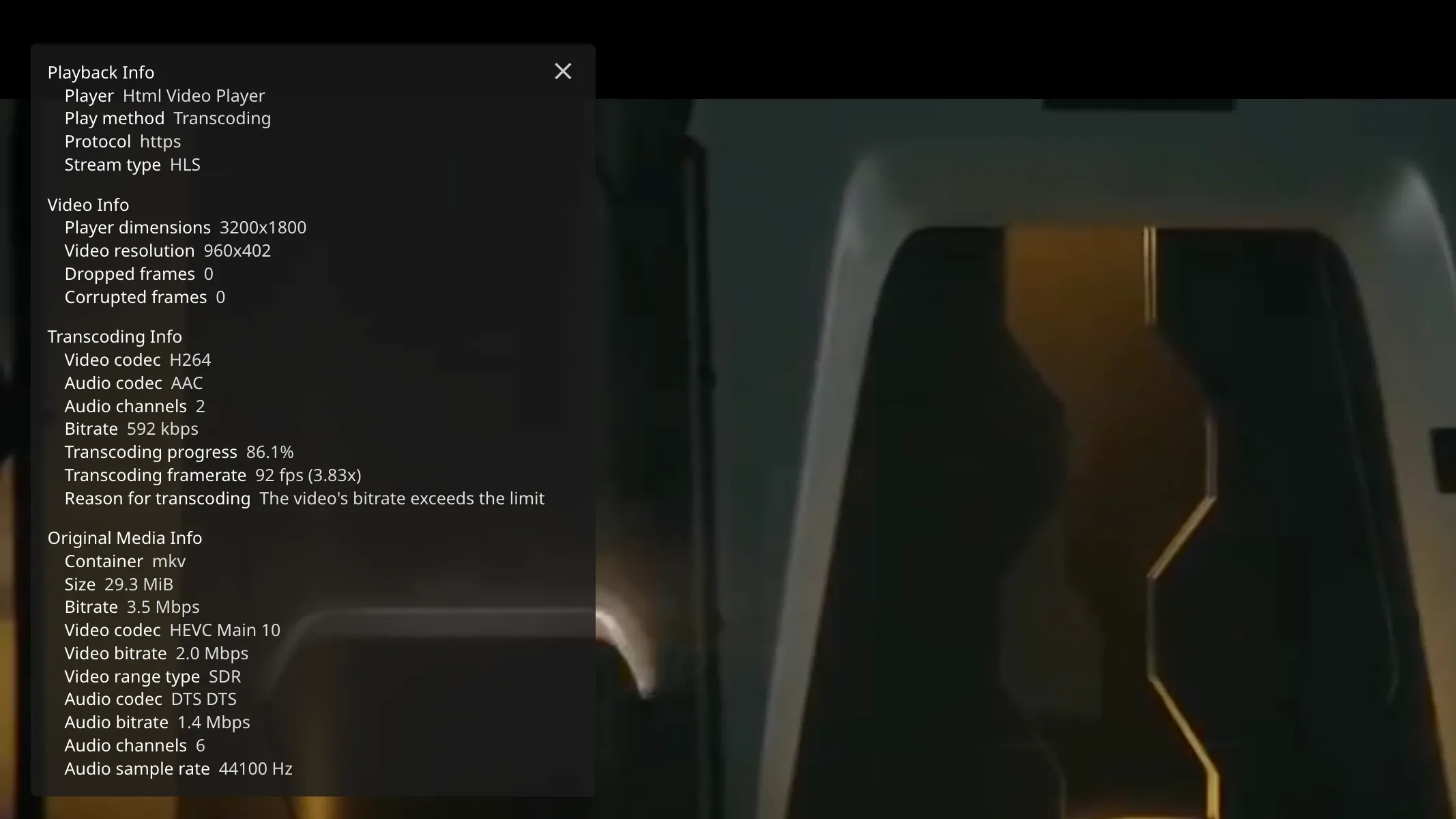
Play the thing that transcodes, in the web interface, and open the playback info overlay. It reports the method and, when it is transcoding, what forced it.
You are looking for a line naming a stream and a reason: the video codec is not supported, the audio codec is not supported, the container is not supported, or the bitrate exceeds the limit.
Write down exactly what it says. Each one has a different fix and guessing wastes an evening.
Tip
Dashboard, then Devices, shows every active session and what each is doing. When the server is busy and you do not know who is asking, look there rather than guessing from the fan noise.
Reason: the bitrate exceeds the limit
The most common reason, and the one that surprises people, because nothing on the server caused it.
Nearly every client has a quality setting, and many ship with a cap well below what a Blu-ray rip needs. With a cap set, the server is obliged to transcode down to it, even though the device could have played the file and the network could have carried it.
Fix it on the client. Find its quality or bitrate setting and set it to maximum, or auto, on your home network.
Then check the server is not capping too. Dashboard, then Users, then a user, has a maximum streaming bitrate. Useful for someone watching from elsewhere on a poor connection. Not useful applied to yourself at home.
Note
This is worth checking first even when the overlay blames something else. A bitrate cap can hide the real reason by forcing a transcode before anything else gets a chance to.
Reason: the audio codec is not supported
Very common, and usually the cheapest to fix, because it is often one track on a file that is otherwise fine.
Many films carry DTS, DTS-HD or TrueHD audio, which plenty of devices will not decode. The video would have direct played perfectly. The sound is what forced the whole film to be rebuilt.
Three fixes, in order of effort.
Pick a different audio track
Most releases include a simpler AAC or AC3 track alongside the fancy one. Selecting it during playback is often the entire solution.
Set a default
A library’s settings include a preferred audio language and codec behaviour, so the sensible track gets picked without you thinking about it.
Re-encode the audio only, once, offline. A tool that copies the video stream untouched and re-encodes only the audio gives you a file that direct plays forever, in a couple of minutes per film and with no picture loss at all.
Reason: the video codec is not supported
The expensive one, because the video is the part that costs the most to rebuild.
Usually one of three things: HEVC on a device that cannot decode it, AV1 on almost anything older than very recent, or 10-bit video on a device that only handles 8-bit.
There is no server setting that makes a device decode a format it cannot decode. The real options are to use a client that can, or to keep a second copy of the file in a format that device handles.
Note
Apple hardware is unusually good here, and predictably so. Recent iPhones and iPads decode HEVC, including 10-bit, in hardware. What an iPhone and iPad can play without transcoding is the list. A client that plays the file as it is rather than asking the server to rebuild it is how you make use of that, which is what JellyMold does.
Reason: subtitles
The reason that catches people out, because it only happens when subtitles are switched on, so the same file behaves differently depending on a toggle.
Text subtitles, SRT and ASS, are sent to the player and drawn by it. No transcoding.
Image subtitles, PGS and VOBSUB, the kind that come off Blu-rays and DVDs, are pictures. Many players cannot overlay them, so the server burns them into the video, and burning anything into the video means re-encoding all of it.
The fix is to get a text subtitle for that film. Set up OpenSubtitles on your Jellyfin server makes that automatic, and it is the single highest-value change on this page: it turns a whole category of transcodes into nothing at all.
You can also extract the text subtitles that are already inside your files, as a scheduled task, which makes them available without any downloading.

When you genuinely cannot avoid it
Sometimes the device simply cannot play the file, and that is the end of it. Make the transcode cheap rather than trying to prevent it.
Turn on hardware acceleration under Dashboard, then Playback. An Intel chip with QuickSync, an Nvidia card, or Apple silicon will do the work on dedicated hardware instead of the processor, which is the difference between one stream and several.
Set the throttling and the transcode path sensibly. Transcoding to a fast disk, or to memory if you have plenty, is noticeably better than to a slow one.
Careful
Hardware acceleration makes a transcode cheap. It does not make it good. The quality is lost in the re-encoding itself, not in which chip did it, so this is damage control rather than a fix.
A quick checklist
- Read the reason in the playback info overlay
- Set the client’s quality to maximum on your own network
- Check the user’s maximum bitrate on the server
- Try a different audio track
- Get text subtitles instead of image ones
- Use a client that direct plays what your device can decode
- Only then, turn on hardware acceleration